Jun 18, 2025
Enhancing Report Building Efficiency for Power Users
Designing a bulk filter selection workflow that reduces effort and saves time for power users who handle large, repetitive datasets.
Dashboards
Product Design
Executive Summary
Power users needed a faster way to make large selections in filter dropdowns.
Eliminating repetitive selection effort
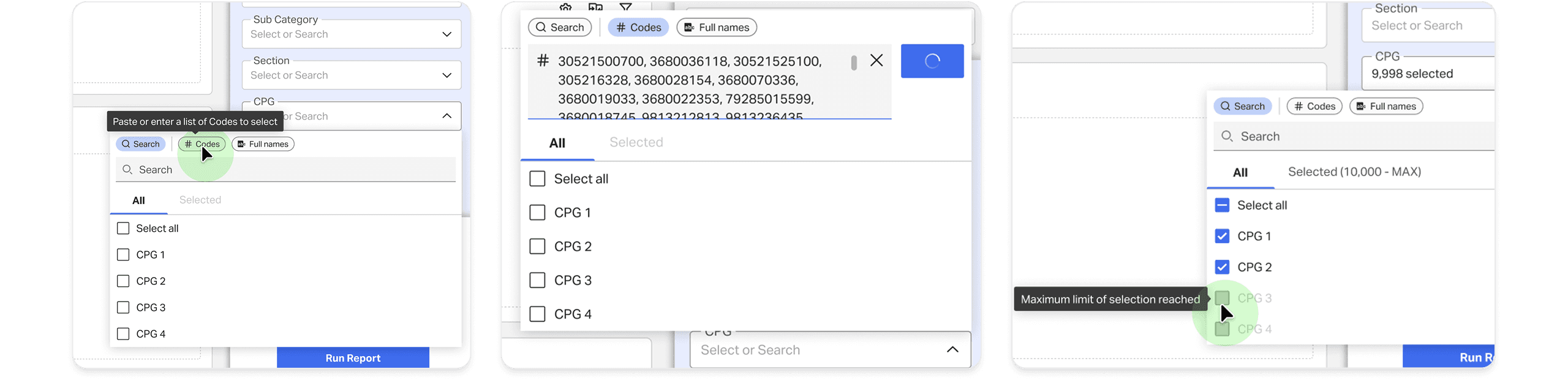
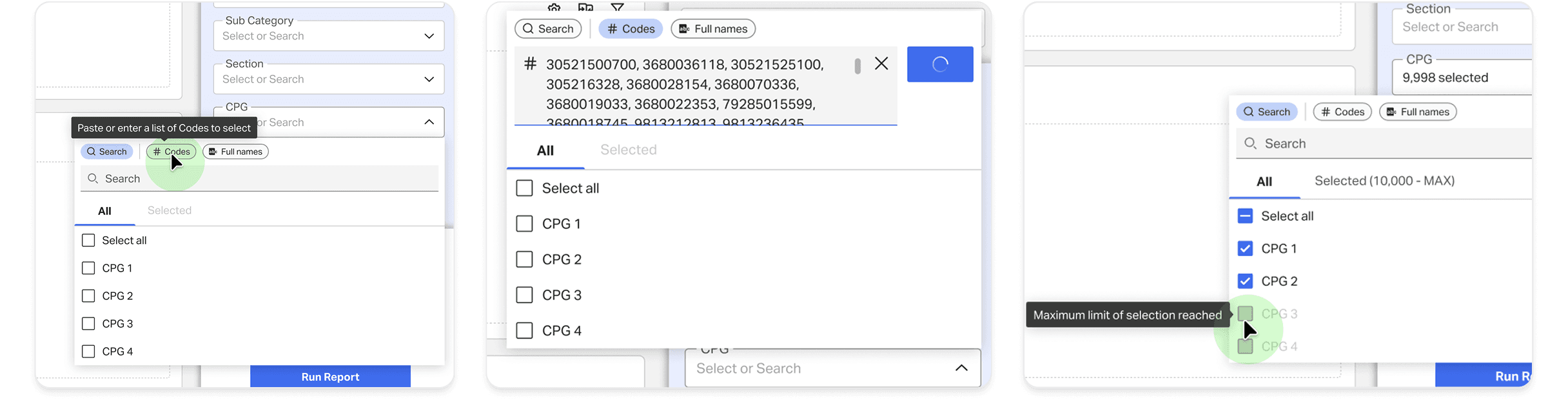
BI users building reports struggled with the time-intensive task of making large selections in filter dropdowns. Through contextual inquiry, I discovered that their real need was not CSV import (original ask to the design team) but a faster, more flexible way to bulk select. By designing a code-pasting workflow with smart validations, we enabled users to copy codes directly from Excel and apply them at once. This drastically reduced effort and improved productivity, especially for power users handling hundreds of selections.ons.

My Role and Team
A cross-functional collaboration focused on performance, workflow design, and user needs.
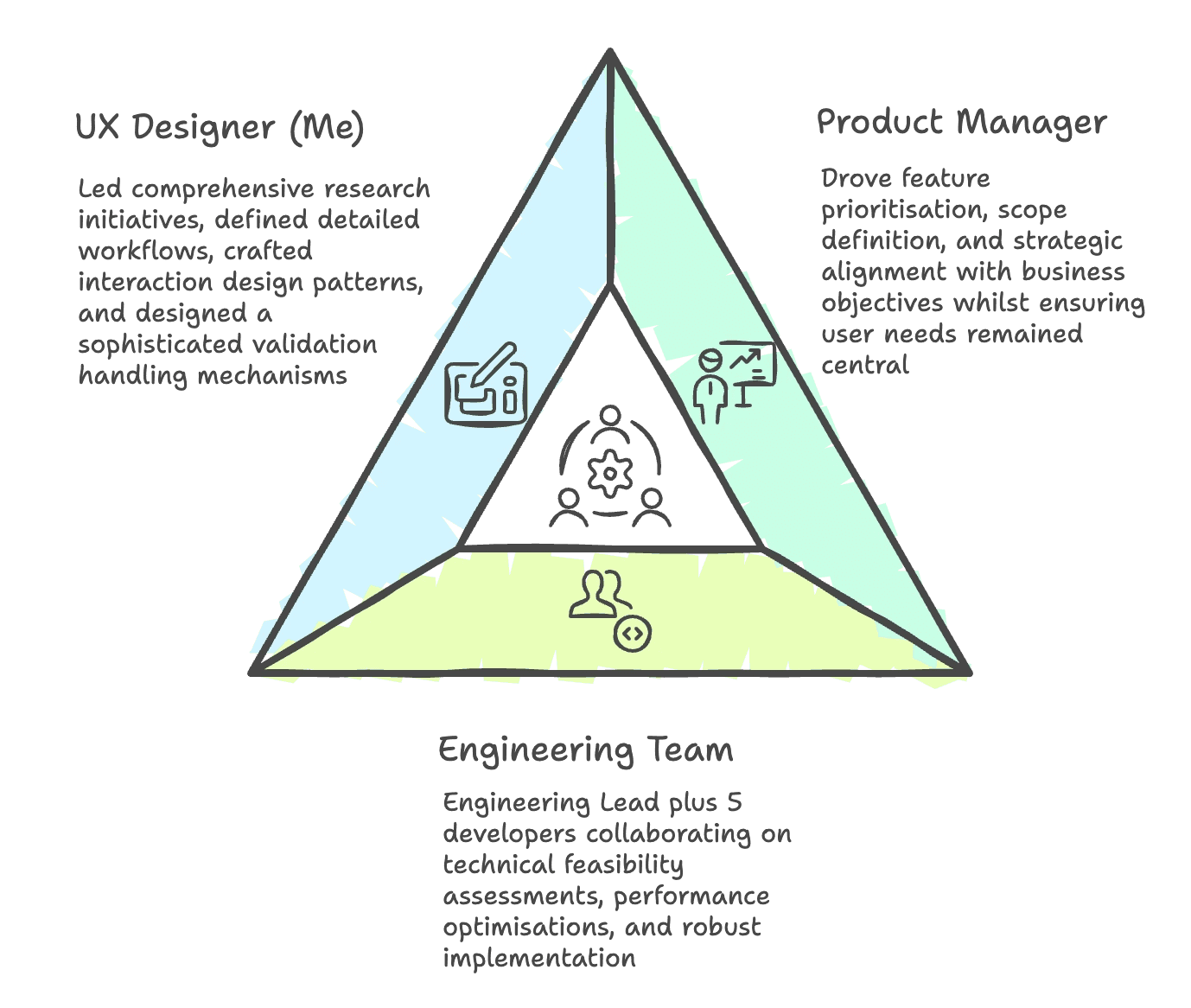
Together, we approached the challenge holistically, ensuring user needs, technical constraints, and business requirements remained balanced throughout the project.
Problem space Research
Understanding how BI users select items at scale: Contextual inquiry and workflow discovery
During contextual inquiry, I observed BI users building reports inside their workflow environment. This helped surface the real pain points.
Users repeatedly searched and selected items one by one.
Many relied on Excel sheets of codes/names, switching between Excel and the report builder repeatedly.
The process was time-consuming and error-prone.
Huge effort investment, significant time cost, and distraction from core task of analysing data and generating insights
From Request to Real Need
What users asked for was not the true solution.
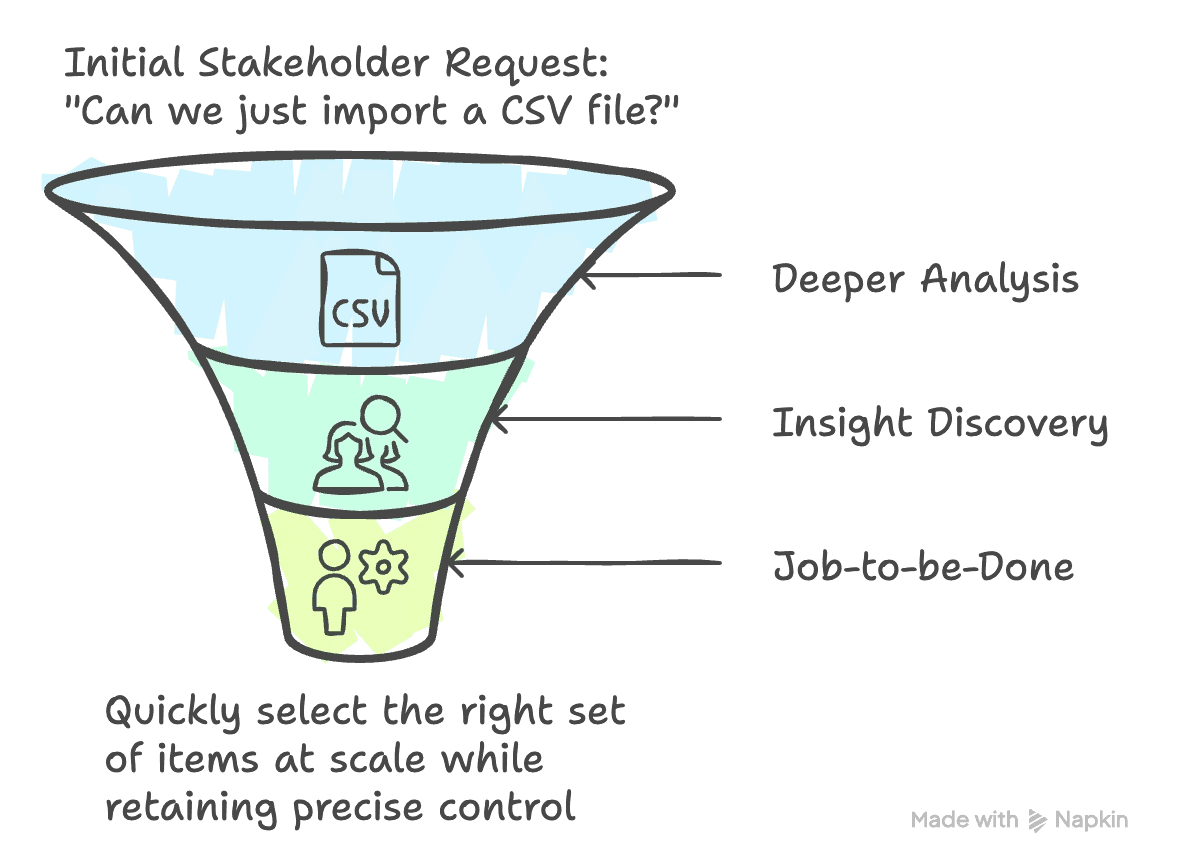
Users initially asked for CSV import. However, CSV import created new problems:
Users did not always want to import everything inside a CSV.
They would need to create or reformat CSV files repeatedly.
Formatting errors could interrupt their workflow.
Actual Job-to-be-Done: Quickly select the right set of items at scale while retaining precise control
Design Outcome: Faster, more flexible bulk selection with reduced manual effort
Solution Space
Exploring and evaluating different approaches.
Working with the Product Manager, I explored multiple directions:
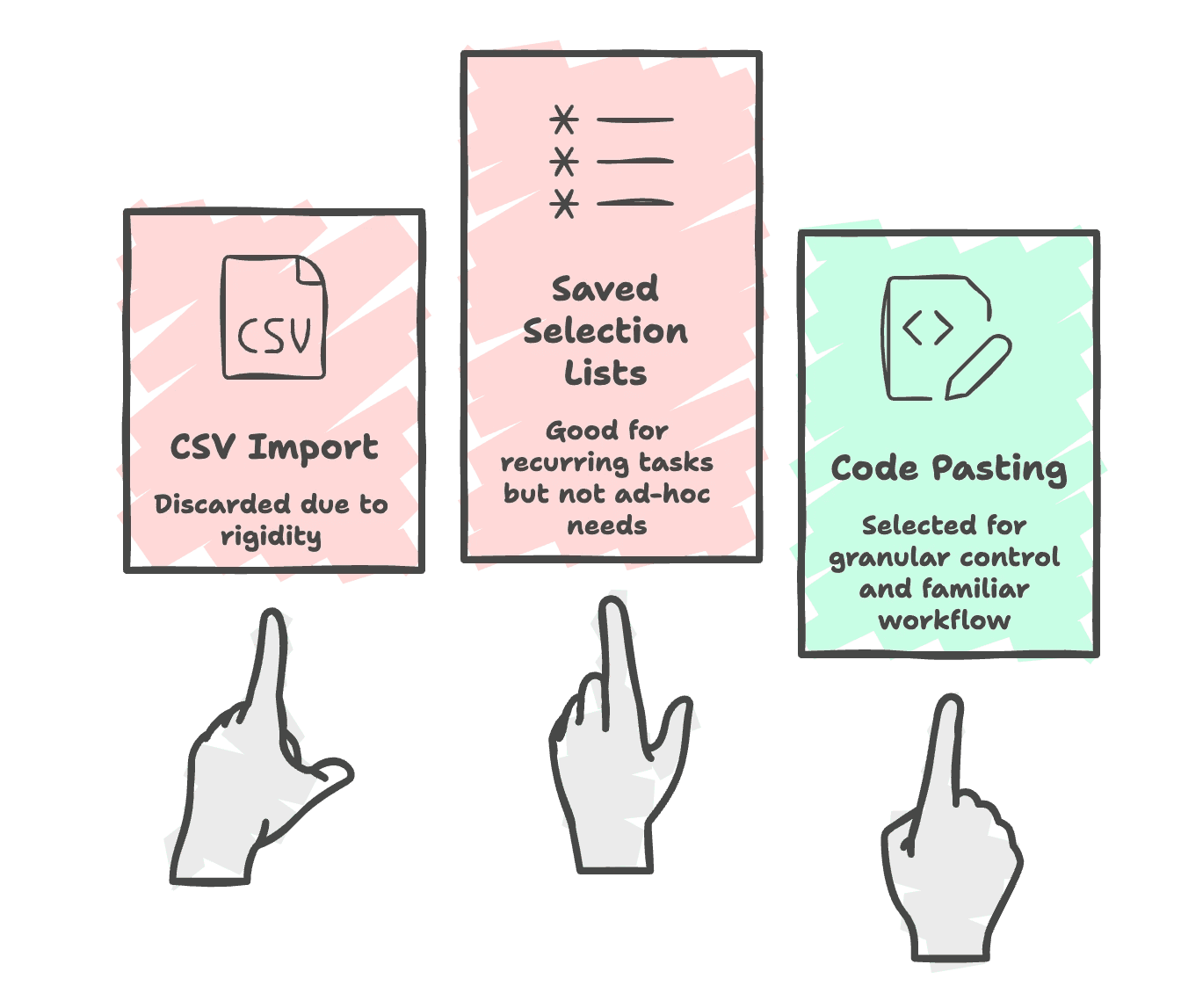
Rejected solutions:
CSV import
Introduced rigidity and formatting dependencies, making it costly to adjust selections as needs changed.
Required users to recreate or reformat files for each variation, adding unnecessary overhead.
Saved selection lists
Worked well for predictable, recurring scenarios but fell short for ad-hoc decision making.
Both approaches constrained users instead of supporting the fluid way they worked day to day.
Accepted Solution:
Code Pasting
Users already curated and refined selections in Excel, making copy-paste a natural and familiar action.
It required no file setup, validation, or formatting rules.
Users could easily add, remove, or adjust selections without restarting the workflow.
This approach preserved granular control while enabling faster, more flexible bulk selection.
It aligned most closely with the underlying job-to-be-done: selecting the right items at scale with precision and minimal manual effort.
Designing the Experience
Supporting both simple and advanced selection needs - Two modes for two different workflows
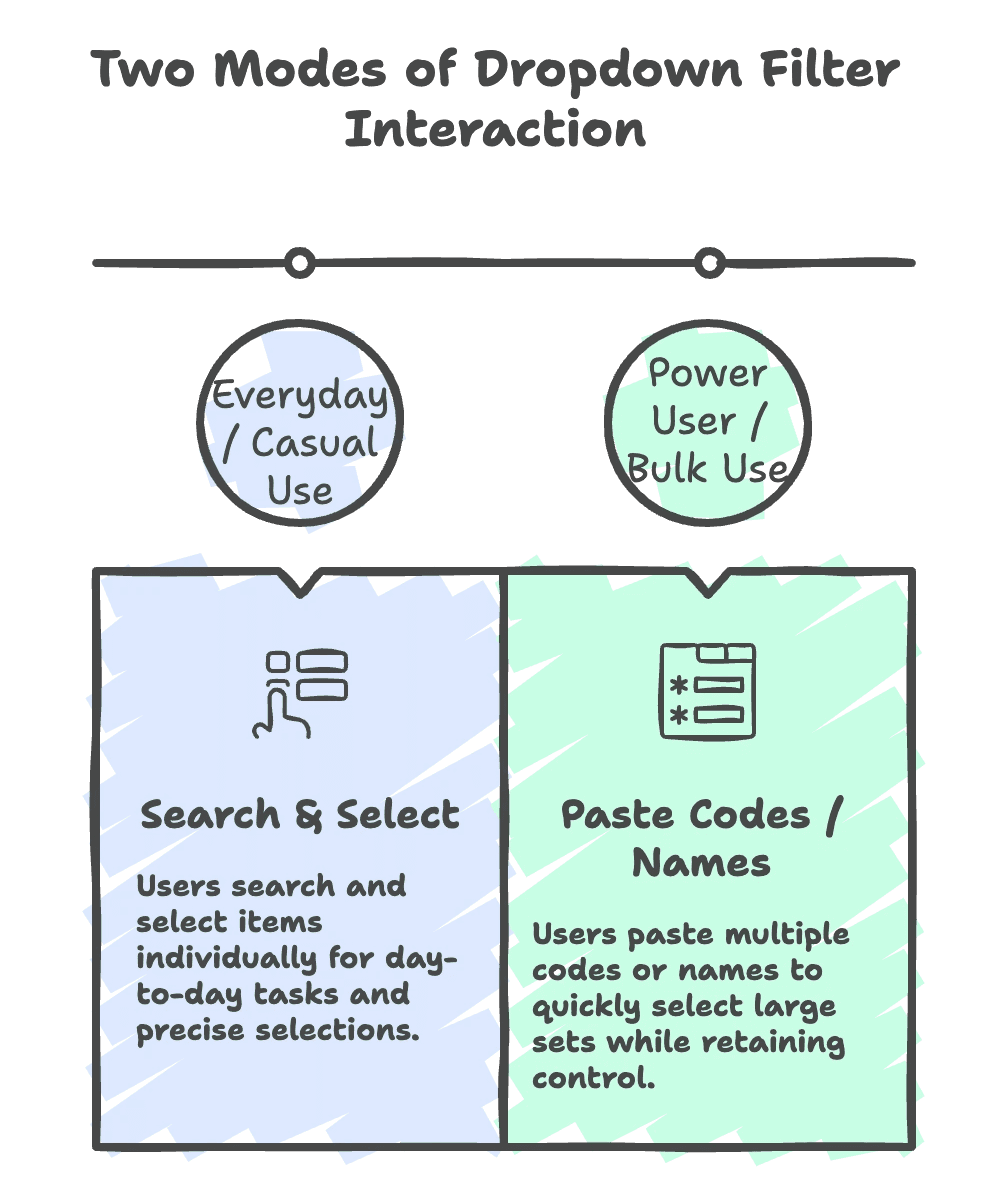
Rather than optimizing for a single interaction model, the solution was designed to support two distinct user intents. For everyday workflows, Search & Select remained the primary mode, enabling users to make precise, individual selections with confidence during routine tasks. This preserved familiarity and ensured the dropdown continued to work well for exploration and accuracy.
For power users working with large datasets, a separate Paste Codes / Names mode was introduced. This mode reduced the effort required to perform high-volume selections by allowing users to paste multiple values at once, while still maintaining visibility and control over what was selected.
By treating these modes as complementary rather than interchangeable, the experience could scale across both casual and advanced usage patterns without compromising usability for either group.
Challenges and Solutions
Balancing user needs with performance limits and system constraints - Constraints that shaped the final workflow
Performance Limits
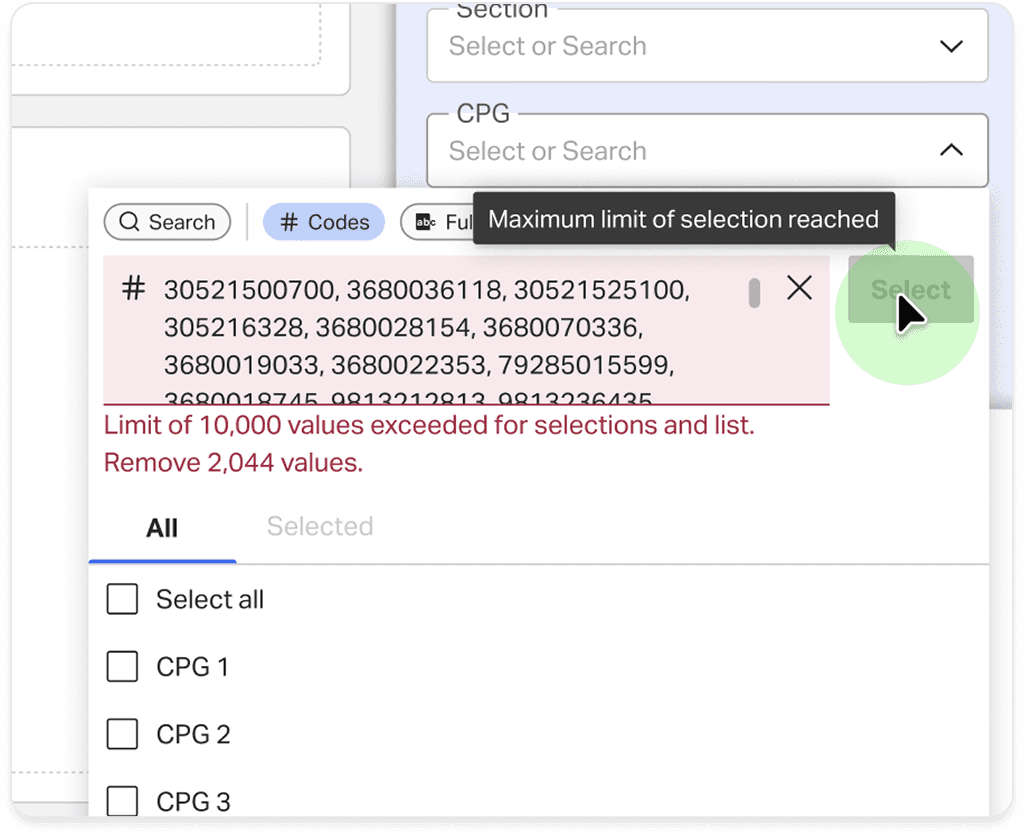
Issue: Backend/API load if too many codes are sent.
Decision: Cap at 10,000 codes per action (configurable).
Validation: Frontend blocks anything above the cap.
When to Trigger Selection?
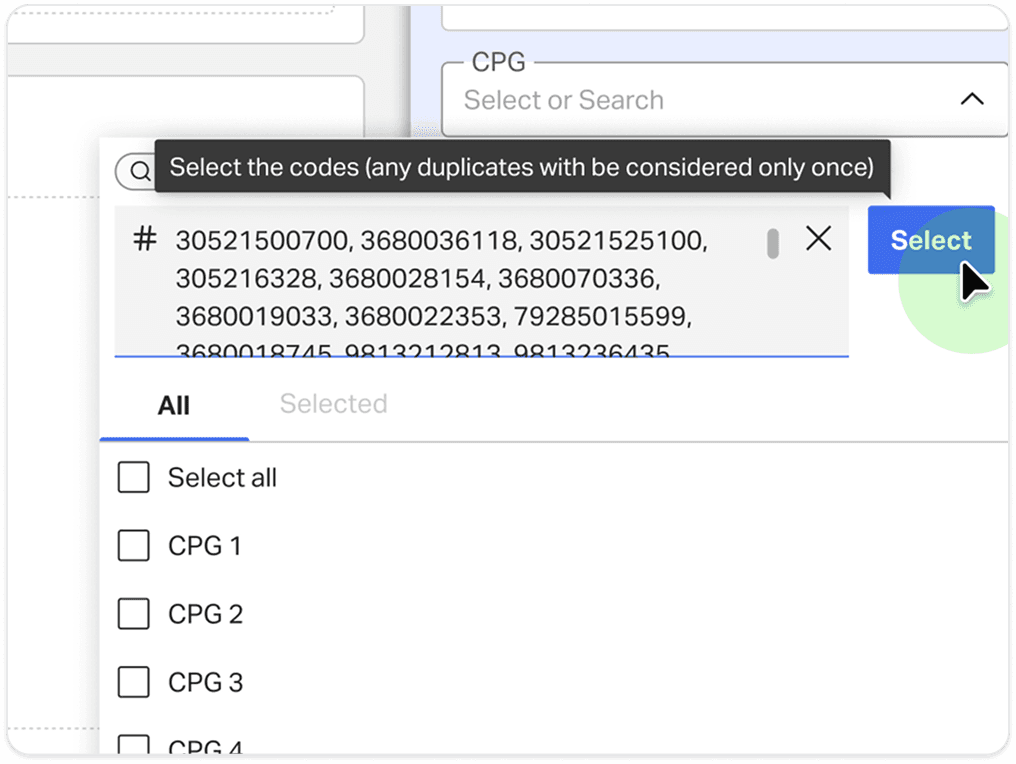
Initial idea: Select in real time like search.
Problem: It would overwhelm the backend with each keystroke.
Solution: Added a CTA (“Apply Selections”) for batch processing.
Validations (Duplicates, No matching results, No permission)
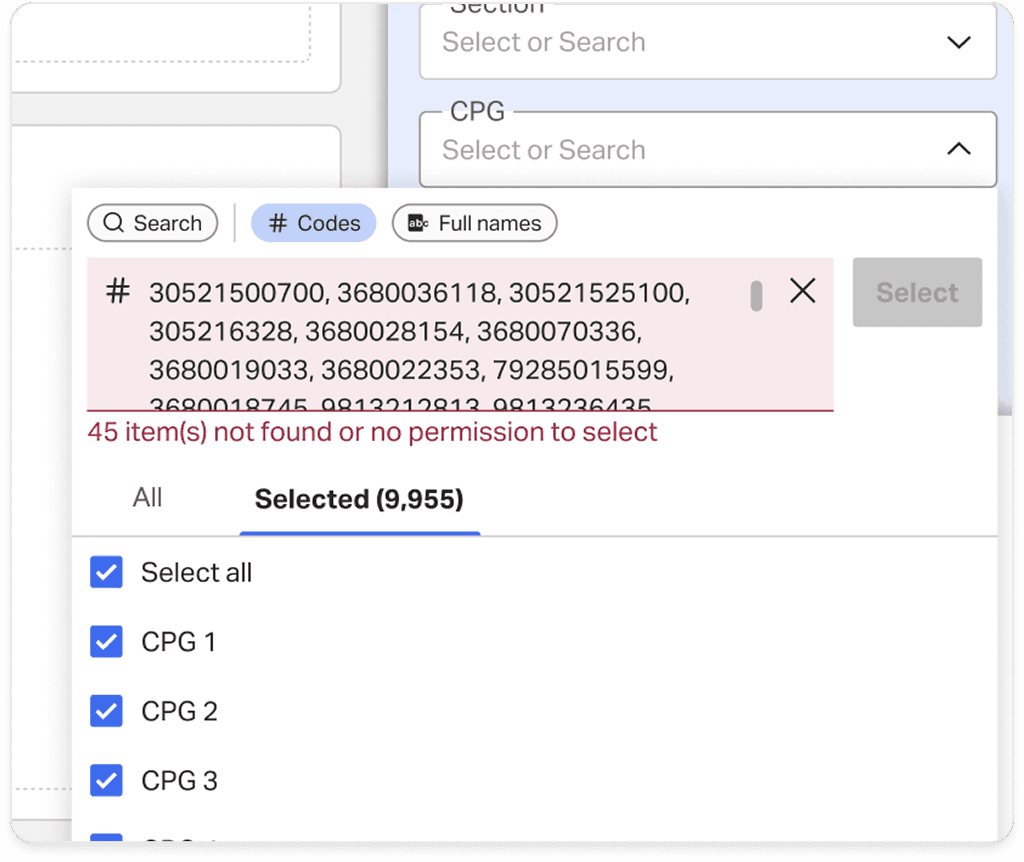
Constraint: Frontend doesn’t load all dropdown items (lazy loading).
Approach:
Frontend validates for the count limit.
Backend validates for duplicates, no matching results, and permission issues.
UX: Errors are shown inline in the paste box; successful codes disappear once applied.
Switching Modes Midway
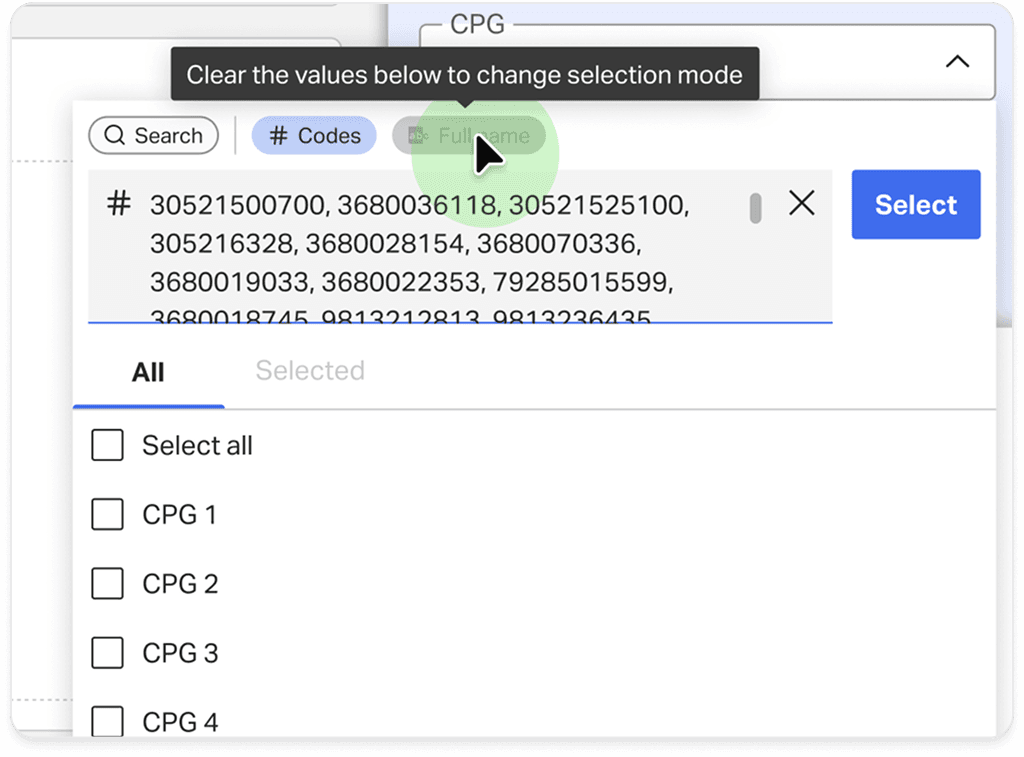
Problem: What if a user pastes codes but switches back to search?
Solution: Mode switching is disabled until pasted codes are cleared, preventing confusion.
Testing and Feedback
Pilot testing with BI power users - Clear time savings and strong adoption
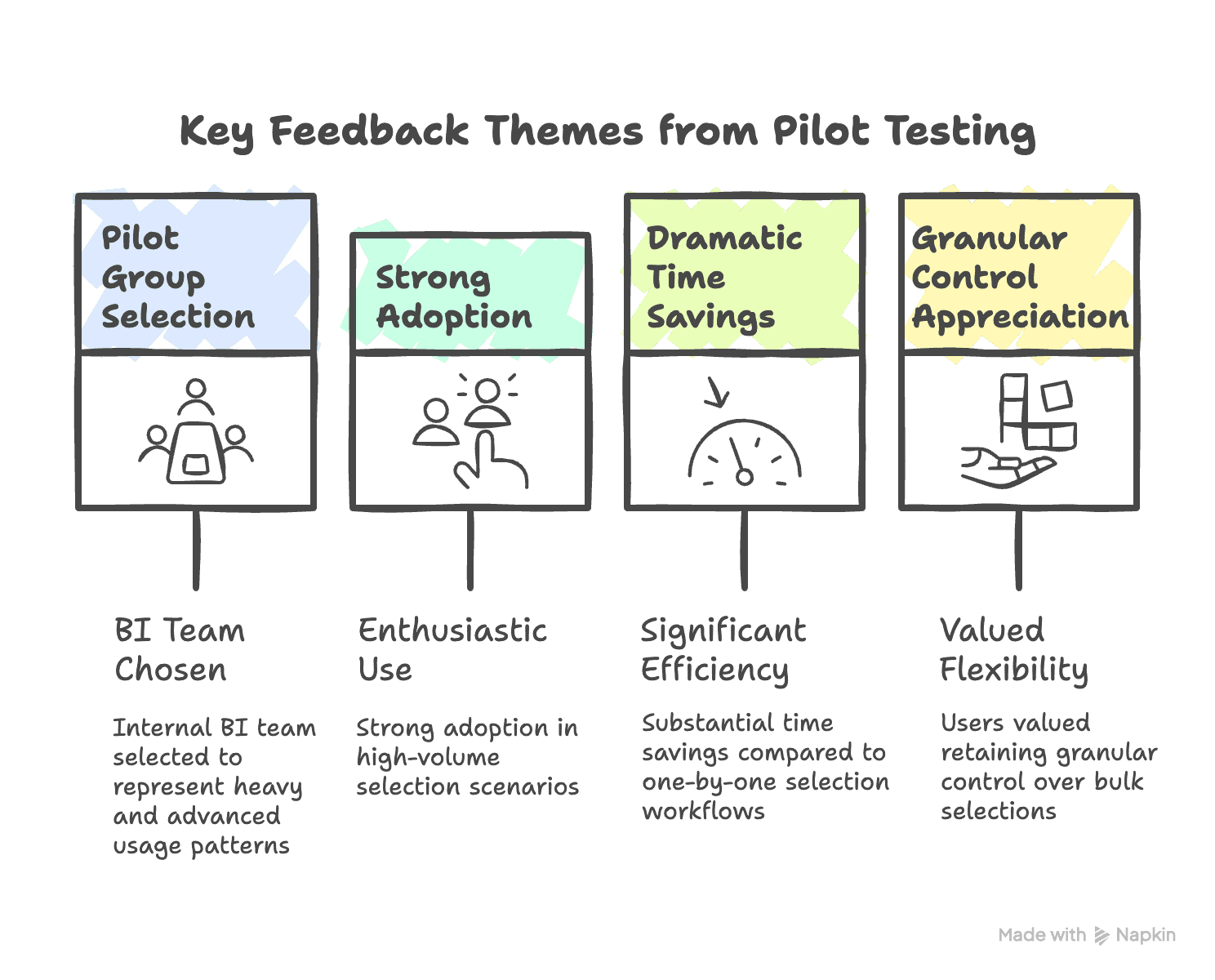
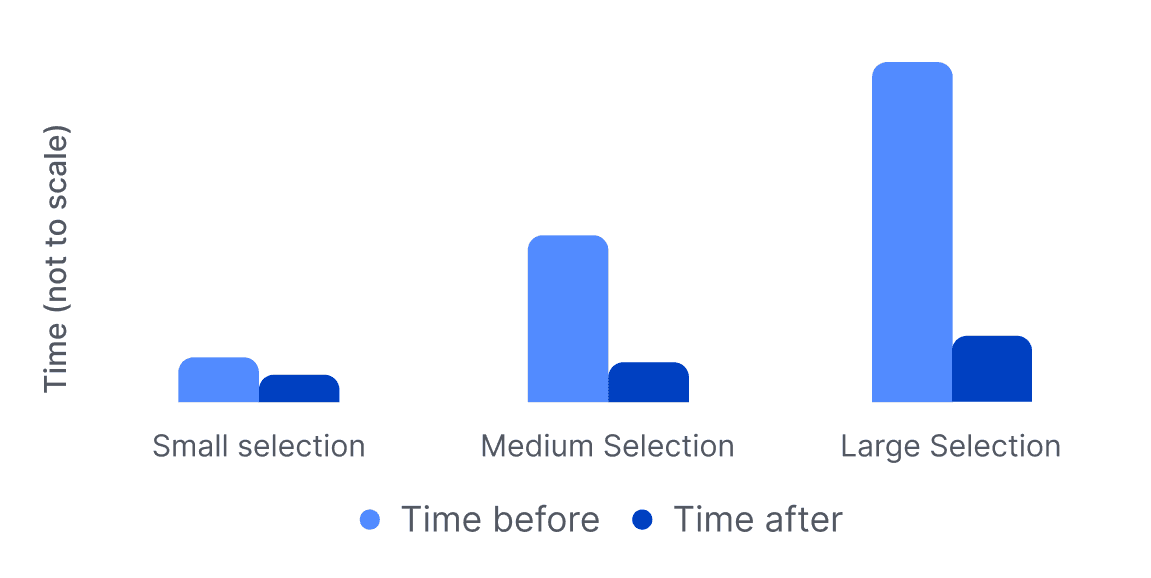
The pilot validated both the direction and the underlying assumptions behind the solution. Power users quickly adopted the paste-based workflow for high-volume scenarios, where traditional one-by-one selection had been the most time-consuming. Across feedback sessions, users consistently highlighted meaningful time savings while still feeling in control of their selections.
Equally important, the feedback reinforced the decision to preserve granular control rather than relying on rigid bulk mechanisms such as CSV imports. Users appreciated the ability to review, adjust, and refine their selections after bulk actions, which helped maintain trust and confidence in the workflow. These insights informed subsequent refinements and gave us confidence to move forward with broader rollout.
Outcome
A small feature with a large productivity impact.
The bulk pasting feature transformed a tedious and manual workflow into a fast and efficient one. It reduced effort, saved time, and improved the experience for power users.
Cross-functional collaboration ensured that design, product, and engineering delivered a solution that was scalable, technically sound, and truly valuable to users.
More Works
FAQ
01
What kind of projects have you worked on?
02
How do you usually collaborate on projects?
03
Do you take freelance or consulting projects?
04
What tools do you use?
05
How do you approach new projects?
06
Can you help set up a design system?
07
How can I get in touch?
Jun 18, 2025
Enhancing Report Building Efficiency for Power Users
Designing a bulk filter selection workflow that reduces effort and saves time for power users who handle large, repetitive datasets.
Dashboards
Product Design
Executive Summary
Power users needed a faster way to make large selections in filter dropdowns.
Eliminating repetitive selection effort
BI users building reports struggled with the time-intensive task of making large selections in filter dropdowns. Through contextual inquiry, I discovered that their real need was not CSV import (original ask to the design team) but a faster, more flexible way to bulk select. By designing a code-pasting workflow with smart validations, we enabled users to copy codes directly from Excel and apply them at once. This drastically reduced effort and improved productivity, especially for power users handling hundreds of selections.ons.
My Role and Team
A cross-functional collaboration focused on performance, workflow design, and user needs.
Together, we approached the challenge holistically, ensuring user needs, technical constraints, and business requirements remained balanced throughout the project.
Problem space Research
Understanding how BI users select items at scale: Contextual inquiry and workflow discovery
During contextual inquiry, I observed BI users building reports inside their workflow environment. This helped surface the real pain points.
Users repeatedly searched and selected items one by one.
Many relied on Excel sheets of codes/names, switching between Excel and the report builder repeatedly.
The process was time-consuming and error-prone.
Huge effort investment, significant time cost, and distraction from core task of analysing data and generating insights
From Request to Real Need
What users asked for was not the true solution.
Users initially asked for CSV import. However, CSV import created new problems:
Users did not always want to import everything inside a CSV.
They would need to create or reformat CSV files repeatedly.
Formatting errors could interrupt their workflow.
Actual Job-to-be-Done: Quickly select the right set of items at scale while retaining precise control
Design Outcome: Faster, more flexible bulk selection with reduced manual effort
Solution Space
Exploring and evaluating different approaches.
Working with the Product Manager, I explored multiple directions:
Rejected solutions:
CSV import
Introduced rigidity and formatting dependencies, making it costly to adjust selections as needs changed.
Required users to recreate or reformat files for each variation, adding unnecessary overhead.
Saved selection lists
Worked well for predictable, recurring scenarios but fell short for ad-hoc decision making.
Both approaches constrained users instead of supporting the fluid way they worked day to day.
Accepted Solution:
Code Pasting
Users already curated and refined selections in Excel, making copy-paste a natural and familiar action.
It required no file setup, validation, or formatting rules.
Users could easily add, remove, or adjust selections without restarting the workflow.
This approach preserved granular control while enabling faster, more flexible bulk selection.
It aligned most closely with the underlying job-to-be-done: selecting the right items at scale with precision and minimal manual effort.
Designing the Experience
Supporting both simple and advanced selection needs - Two modes for two different workflows
Rather than optimizing for a single interaction model, the solution was designed to support two distinct user intents. For everyday workflows, Search & Select remained the primary mode, enabling users to make precise, individual selections with confidence during routine tasks. This preserved familiarity and ensured the dropdown continued to work well for exploration and accuracy.
For power users working with large datasets, a separate Paste Codes / Names mode was introduced. This mode reduced the effort required to perform high-volume selections by allowing users to paste multiple values at once, while still maintaining visibility and control over what was selected.
By treating these modes as complementary rather than interchangeable, the experience could scale across both casual and advanced usage patterns without compromising usability for either group.
Challenges and Solutions
Balancing user needs with performance limits and system constraints - Constraints that shaped the final workflow
Performance Limits
Issue: Backend/API load if too many codes are sent.
Decision: Cap at 10,000 codes per action (configurable).
Validation: Frontend blocks anything above the cap.
When to Trigger Selection?
Initial idea: Select in real time like search.
Problem: It would overwhelm the backend with each keystroke.
Solution: Added a CTA (“Apply Selections”) for batch processing.
Validations (Duplicates, No matching results, No permission)
Constraint: Frontend doesn’t load all dropdown items (lazy loading).
Approach:
Frontend validates for the count limit.
Backend validates for duplicates, no matching results, and permission issues.
UX: Errors are shown inline in the paste box; successful codes disappear once applied.
Switching Modes Midway
Problem: What if a user pastes codes but switches back to search?
Solution: Mode switching is disabled until pasted codes are cleared, preventing confusion.
Testing and Feedback
Pilot testing with BI power users - Clear time savings and strong adoption
The pilot validated both the direction and the underlying assumptions behind the solution. Power users quickly adopted the paste-based workflow for high-volume scenarios, where traditional one-by-one selection had been the most time-consuming. Across feedback sessions, users consistently highlighted meaningful time savings while still feeling in control of their selections.
Equally important, the feedback reinforced the decision to preserve granular control rather than relying on rigid bulk mechanisms such as CSV imports. Users appreciated the ability to review, adjust, and refine their selections after bulk actions, which helped maintain trust and confidence in the workflow. These insights informed subsequent refinements and gave us confidence to move forward with broader rollout.
Outcome
A small feature with a large productivity impact.
The bulk pasting feature transformed a tedious and manual workflow into a fast and efficient one. It reduced effort, saved time, and improved the experience for power users.
Cross-functional collaboration ensured that design, product, and engineering delivered a solution that was scalable, technically sound, and truly valuable to users.
More Works
FAQ
01
What kind of projects have you worked on?
02
How do you usually collaborate on projects?
03
Do you take freelance or consulting projects?
04
What tools do you use?
05
How do you approach new projects?
06
Can you help set up a design system?
07
How can I get in touch?
Jun 18, 2025
Enhancing Report Building Efficiency for Power Users
Designing a bulk filter selection workflow that reduces effort and saves time for power users who handle large, repetitive datasets.
Dashboards
Product Design
Executive Summary
Power users needed a faster way to make large selections in filter dropdowns.
Eliminating repetitive selection effort
BI users building reports struggled with the time-intensive task of making large selections in filter dropdowns. Through contextual inquiry, I discovered that their real need was not CSV import (original ask to the design team) but a faster, more flexible way to bulk select. By designing a code-pasting workflow with smart validations, we enabled users to copy codes directly from Excel and apply them at once. This drastically reduced effort and improved productivity, especially for power users handling hundreds of selections.ons.
My Role and Team
A cross-functional collaboration focused on performance, workflow design, and user needs.
Together, we approached the challenge holistically, ensuring user needs, technical constraints, and business requirements remained balanced throughout the project.
Problem space Research
Understanding how BI users select items at scale: Contextual inquiry and workflow discovery
During contextual inquiry, I observed BI users building reports inside their workflow environment. This helped surface the real pain points.
Users repeatedly searched and selected items one by one.
Many relied on Excel sheets of codes/names, switching between Excel and the report builder repeatedly.
The process was time-consuming and error-prone.
Huge effort investment, significant time cost, and distraction from core task of analysing data and generating insights
From Request to Real Need
What users asked for was not the true solution.
Users initially asked for CSV import. However, CSV import created new problems:
Users did not always want to import everything inside a CSV.
They would need to create or reformat CSV files repeatedly.
Formatting errors could interrupt their workflow.
Actual Job-to-be-Done: Quickly select the right set of items at scale while retaining precise control
Design Outcome: Faster, more flexible bulk selection with reduced manual effort
Solution Space
Exploring and evaluating different approaches.
Working with the Product Manager, I explored multiple directions:
Rejected solutions:
CSV import
Introduced rigidity and formatting dependencies, making it costly to adjust selections as needs changed.
Required users to recreate or reformat files for each variation, adding unnecessary overhead.
Saved selection lists
Worked well for predictable, recurring scenarios but fell short for ad-hoc decision making.
Both approaches constrained users instead of supporting the fluid way they worked day to day.
Accepted Solution:
Code Pasting
Users already curated and refined selections in Excel, making copy-paste a natural and familiar action.
It required no file setup, validation, or formatting rules.
Users could easily add, remove, or adjust selections without restarting the workflow.
This approach preserved granular control while enabling faster, more flexible bulk selection.
It aligned most closely with the underlying job-to-be-done: selecting the right items at scale with precision and minimal manual effort.
Designing the Experience
Supporting both simple and advanced selection needs - Two modes for two different workflows
Rather than optimizing for a single interaction model, the solution was designed to support two distinct user intents. For everyday workflows, Search & Select remained the primary mode, enabling users to make precise, individual selections with confidence during routine tasks. This preserved familiarity and ensured the dropdown continued to work well for exploration and accuracy.
For power users working with large datasets, a separate Paste Codes / Names mode was introduced. This mode reduced the effort required to perform high-volume selections by allowing users to paste multiple values at once, while still maintaining visibility and control over what was selected.
By treating these modes as complementary rather than interchangeable, the experience could scale across both casual and advanced usage patterns without compromising usability for either group.
Challenges and Solutions
Balancing user needs with performance limits and system constraints - Constraints that shaped the final workflow
Performance Limits
Issue: Backend/API load if too many codes are sent.
Decision: Cap at 10,000 codes per action (configurable).
Validation: Frontend blocks anything above the cap.
When to Trigger Selection?
Initial idea: Select in real time like search.
Problem: It would overwhelm the backend with each keystroke.
Solution: Added a CTA (“Apply Selections”) for batch processing.
Validations (Duplicates, No matching results, No permission)
Constraint: Frontend doesn’t load all dropdown items (lazy loading).
Approach:
Frontend validates for the count limit.
Backend validates for duplicates, no matching results, and permission issues.
UX: Errors are shown inline in the paste box; successful codes disappear once applied.
Switching Modes Midway
Problem: What if a user pastes codes but switches back to search?
Solution: Mode switching is disabled until pasted codes are cleared, preventing confusion.
Testing and Feedback
Pilot testing with BI power users - Clear time savings and strong adoption
The pilot validated both the direction and the underlying assumptions behind the solution. Power users quickly adopted the paste-based workflow for high-volume scenarios, where traditional one-by-one selection had been the most time-consuming. Across feedback sessions, users consistently highlighted meaningful time savings while still feeling in control of their selections.
Equally important, the feedback reinforced the decision to preserve granular control rather than relying on rigid bulk mechanisms such as CSV imports. Users appreciated the ability to review, adjust, and refine their selections after bulk actions, which helped maintain trust and confidence in the workflow. These insights informed subsequent refinements and gave us confidence to move forward with broader rollout.
Outcome
A small feature with a large productivity impact.
The bulk pasting feature transformed a tedious and manual workflow into a fast and efficient one. It reduced effort, saved time, and improved the experience for power users.
Cross-functional collaboration ensured that design, product, and engineering delivered a solution that was scalable, technically sound, and truly valuable to users.
More Works
FAQ
What kind of projects have you worked on?
How do you usually collaborate on projects?
Do you take freelance or consulting projects?
What tools do you use?
How do you approach new projects?
Can you help set up a design system?
How can I get in touch?